

Travelbum
A social media with map and itinerary
Overview
Travelbum is a mobile App designed for user to explore, upload, and collect photos of internet-famous sights, and systemically generate optimal itinerary from their checklists. By connecting the function of map, itinerary and social media, Travelbum increased 40% efficiency in searching and planning for trips while saving user from switching from different platforms.
Scope
Problem Framing
Concept Development
Validation
User Testing
Duration
3 Months
My role
User Research
UX Design
Visual Design
Usability Design
Design Strategy
Branding Design
Tools
Pencil and paper
Photoshop
Figma
What’s the context?
The project client is a leading travel brand who sees new opportunities emerging in the digital space around how people plan travel. I will focus my research on one age group and one segment of the travel experience. The goal is to design a mobile app that needed seriously by the target audiences and also fulfill a void in the current market.
Why is this a problem:
82 percent of the population in the United States had a social networking profile, sharing their life through photo has become a common and popular activity. More people are willing to upload photos of themselves for likes and attentions in daily life, especially on their vocations.
Aims:
Build an app has both photo sharing and planning functions.
Stop people from switching between multiple platforms while planning
Generate quick and easy itinerary and reduce information overload
Outcome:
Design Approach:

DISCOVERY
Target Audience
-
20-30 years old, no children
-
Solo traveler to group of 6
-
Mid disposable income
-
Travel for leisure at least twice a year
Research Goals
-
Learn how target audience plan their trip itineraries
-
Know what tools people use to create trip itineraries.
-
Understand what sources most impact user’s plans.
Interview Objectives
1. What’s travelers motivation of traveling?
2. Do travelers make itinerary and how do they feel about it?
3. What is a traveler's must-do while traveling?
4. What is the most regret thing in a traveler's last travel
People says...

Victoria
23, consultant
“Relaxation & leisure are my motivations”
“Of course, I share my photos, I love to take photos at Instagram hotspots”
“I only make itineraries when I travel with someone who doesn’t make them"
"Sharing my photos on social media is a must do"
“I like to discover the hidden germs and feel accomplished when people ask me about the location.”

Elly
26, Grad Student

Alan
28, Data Analyst
I so regret we missed that pork rib in Vienna, we planed poorly for that trip.
"I LIKE TO MAKE ITINERARIES, ALL I HATE IS TO SWITCH BETWEEN DIFFERENT APPS"
“I don't usually look for photo places, but my girlfriend make me do it anyway”
Persona
I have interviewed with 6 people at the age from 22 to 30 and identified a personas with different consumption habits and barriers, examining their pain points, attitudes and levels of awareness concerning harmful use.

Key Findings
01/
02/
Sharing photos on social media is the trend
Leisure and relaxation are the main motivation
03/
Travelers like to collect locations even they don't have recent travel plans
04/
Travelers usually use 3 or more platforms for planning
Comparative Analysis
Base on the interview, I learn that many travelers collect trips locations from social media posts, and none of the current social media Apps have the function of making itinerary. According to my research most of the itinerary Apps are lack of self-upload function, users can only choose locations pre-set by the Apps.
.png)
DESIGN
Style Guide
The style guide is designed to craft a holistic and simple look. The duo primary colors create a modern feel and rounded corns create a friendly sense.


How might we provide travel destinations / photo spots to collect and create a painless process of making itinerary, which stop people from switching between Apps
OPPORTUNITY

No destination in mind?
Explore here
-
Browse through posts and get detailed information on specific locations
-
Use the nearby tab to discover hot locations close to you
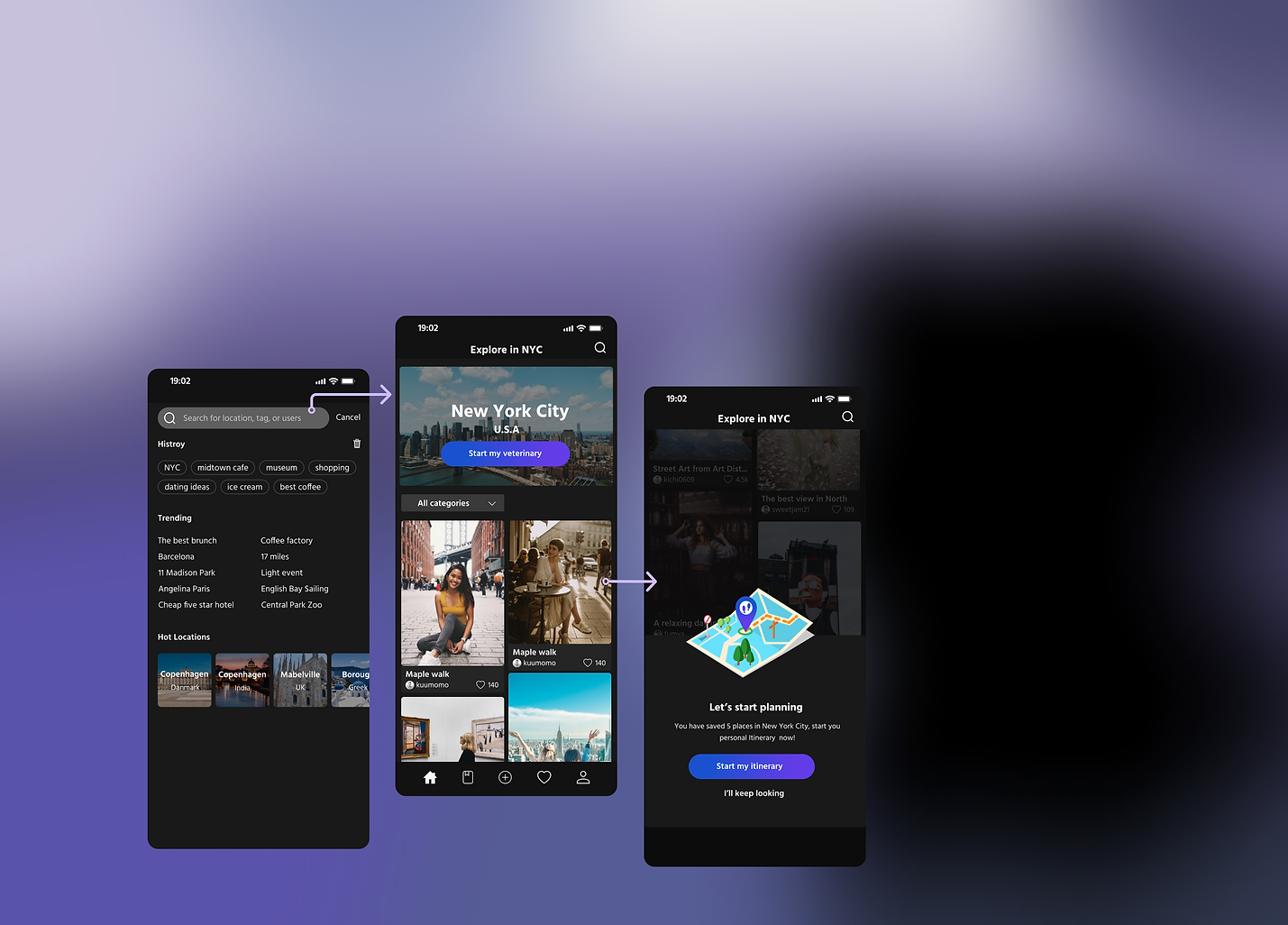
Have something in mind? Search here!
-
Search for any location you are interested in
-
Generate your personal itinerary with 5+ saved locations

Get your itinerary in 2 simple steps
-
First, select a country and a city
-
Second, select a date and use advance setting by option

Drag and move to customize your route
-
The route of current day will be displayed on the map
-
Drag and move the location orders will changes the route

Optimize your travel within one touch
-
Swipe left to delete, move, or replace your selected locations
-
Optimize your location orders to get the most rational route
Refections
I am not my user:
Before doing researches and interviews, I assume my target audience need a day-to-day detailed itinerary with safety alert. My assumption falls apart after having only two interviews, at that time I realized the pervious thoughts was to fulfill my needs not my users. So, I quickly change my direction and modify some of the interview questions, this helped me to find out the real pain point.
Don’t rush to make hi-fi:
As my first mobile App, I was really excited about designing it and wanted to see the work with final UI as soon as possible. Because of this overheated passion, I skipped some of the fundamental steps and jumped to design without fully consideration. This wrong move has caused me more time and effort to step back and redo 1/3 of the works. Fortunately, I was able to change this bad habit and learned the importance of following the design process. This experience also reminded me of what my art professor have said, “A beautiful painting without a subject is just a decoration, not art.”